 QxSprite
AI agents · MCP
Give your AI agent a pixel art editor
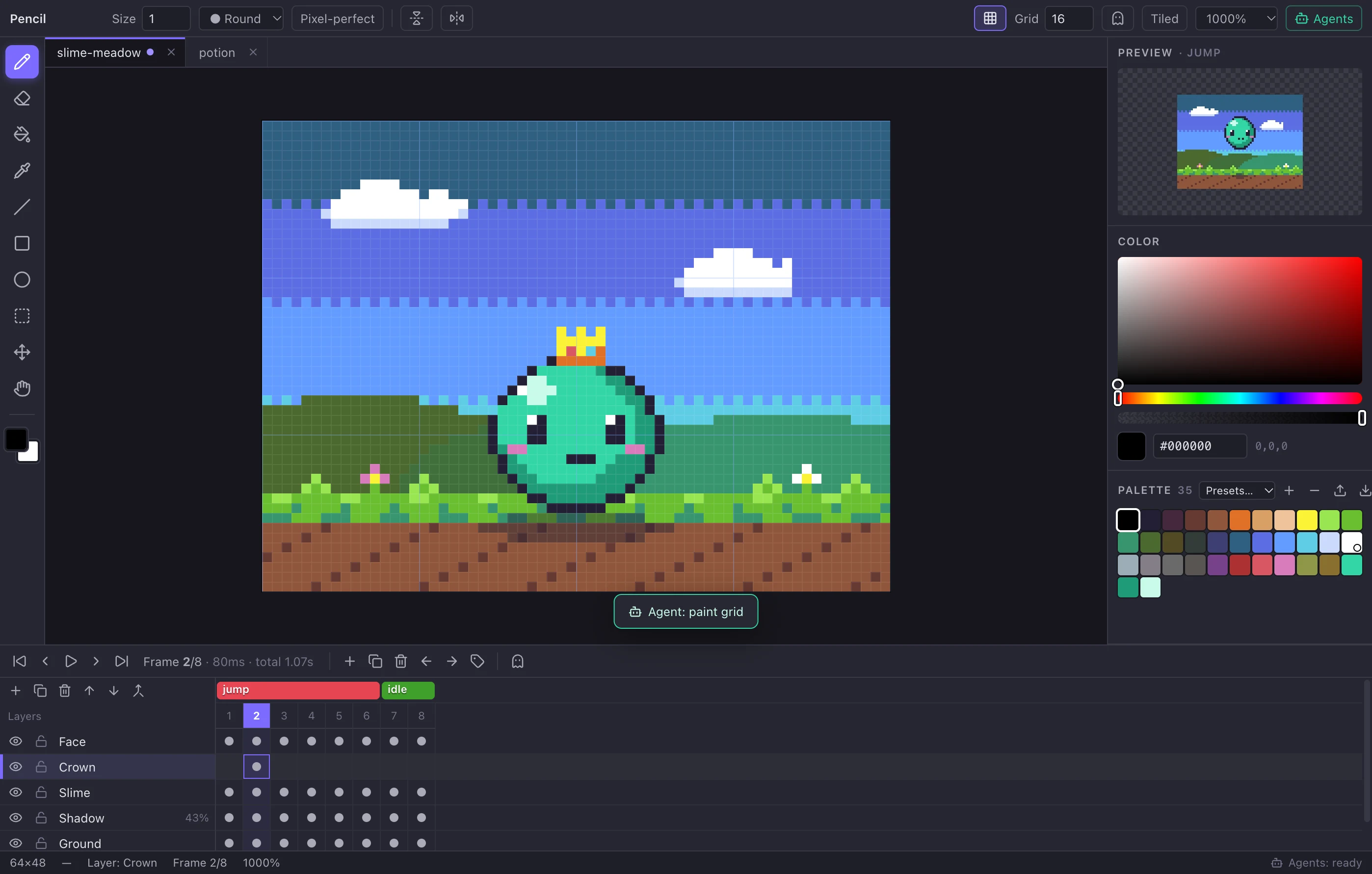
QxSprite's built-in Model Context Protocol server lets agents create sprites, draw, animate, look at their work and export game-ready assets — while you watch and collaborate.
How it works
- Editor open → live mode. The MCP server finds the running QxSprite window through a local, token-protected bridge on 127.0.0.1. Agent edits appear instantly, a toast shows what the agent is doing, and every change is undoable with ⌘Z / Ctrl+Z.
- Editor closed → headless mode. The same tools run in the MCP process directly on files. Use
save_spriteto persist work. Great for CI and background agents. - Want to watch? An agent can call
launch_editorto open the GUI and switch to live mode.
Set up in one minute
Install QxSprite, then open Help ▸ AI Agents (MCP) Setup… in the app — it shows these snippets with the exact paths for your machine. On macOS with the app in /Applications:
Claude Code
claude mcp add qxsprite -e ELECTRON_RUN_AS_NODE=1 -- "/Applications/QxSprite.app/Contents/MacOS/QxSprite" "/Applications/QxSprite.app/Contents/Resources/cli/qxsprite.cjs" mcp
Claude Desktop, Cursor, VS Code, Windsurf, Codex and other MCP clients
{
  "mcpServers": {
    "qxsprite": {
      "command": "/Applications/QxSprite.app/Contents/MacOS/QxSprite",
      "args": [
        "/Applications/QxSprite.app/Contents/Resources/cli/qxsprite.cjs",
        "mcp"
      ],
      "env": {
        "ELECTRON_RUN_AS_NODE": "1"
      }
    }
  }
}
Paths on Windows and Linux
Windows (portable zip): use the folder you extracted, e.g. C:\Tools\QxSprite\QxSprite.exe with C:\Tools\QxSprite\resources\cli\qxsprite.cjs. Linux: ./qxsprite with ./resources/cli/qxsprite.cjs inside the extracted folder. If Node.js 20+ is installed you can use "command": "node" with just the .cjs path, or launch the app binary with --mcp.
Try these prompts
- “Use QxSprite to draw a 32×32 knight in the PICO-8 palette. Check it with render_preview and fix anything that looks off.”
- “Add a 6-frame walk cycle to the knight, tag it ‘walk’, and export a sprite sheet with JSON to
assets/knight.png.” - “Open
enemies.aseprite, recolor the slime from green to purple across all frames, and save it.” - “Make a 16×16 tileset of grass, dirt and stone tiles and export each tile as its own PNG.”
Tips for agents
paint_gridis the fastest way to draw detail: each string is a row, each character a pixel, mapped through a legend.read_pixelswithformat: "grid"returns rows + legend in the same shape — read, modify, paint back.- Always verify with
render_preview(addgrid: trueto count coordinates). - Coordinates start at (0,0) top-left. Frame and layer indices are 0-based; layer 0 is the bottom.
Command line
qxsprite export hero.qxs --sheet build/hero.png --json hash --scale 2
qxsprite export hero.qxs --gif hero.gif --tag walk --scale 4
qxsprite convert hero.aseprite hero.qxs
qxsprite run steps.json      # a list of tool calls: [{"tool": "...", "args": {...}}]
qxsprite tools --json        # every tool with its JSON schema
All 37 tools
| Tool | What it does |
|---|---|
list_sprites | List open sprites and which one is active. Also reports whether you are connected to the live GUI editor or running headless. |
new_sprite | Create a new sprite and make it active. Typical sizes: 16x16, 32x32, 64x64. The palette is a set of swatches you can reference by index in any color argument. |
open_sprite | Open a .qxs (native), .aseprite/.ase, or .png file and make it active. Relative paths resolve against your working directory. |
save_sprite | Save a sprite. Use .qxs (native, lossless) or .aseprite (lossless, Aseprite-compatible). Saving to .png writes frame 0 flattened; .gif writes the animation. Without path, saves to the current file. |
close_sprite | Close an open sprite. Fails if it has unsaved changes unless discard_changes is true. |
get_sprite_info | Dimensions, layers (top to bottom), frames with durations, tags, palette (index:hex), active layer/frame, and save state. |
set_active | Change the active sprite, layer, and/or frame. Tools default to the active layer and frame. In the GUI this also moves the user's view. |
draw_pixels | Set individual pixels. Each entry is {x, y, color?}; entries without color use the top-level color. Out-of-bounds pixels are ignored. Use color "transparent" to erase. |
paint_grid | Paint a block of pixels from text rows — the easiest way to draw pixel art. Each string in `rows` is one row; each character is one pixel. '.' and ' ' leave the pixel unchanged (unless erase_dots is true). Map other characters to colors with `legend`, e.g. {"k":"#000000","s":"#f2c79a","x":"transparent"}. Without a legend, 0-9, a-z, A-Z mean palette indices 0-61 (a=10, z=35, A=36). Tip: read_pixels with format "grid" returns rows + legend in this exact format, so you can read, edit and paint back. |
read_pixels | Read pixels from a region. format "grid" (default) returns text rows plus a legend (char -> hex), using palette-index characters where colors match the palette and "." for transparent — feed it straight back into paint_grid. format "list" returns only non-transparent pixels as [x, y, hex]. Omit layer (or pass composite:true) to read what is visible (all visible layers merged). |
draw_line | Draw a pixel-perfect line between two points (inclusive). Optional brush size. |
draw_rect | Draw a rectangle outline or filled rectangle. |
draw_ellipse | Draw an ellipse/circle inscribed in the given bounding box (outline or filled). For a circle of diameter d at (x,y) top-left, use width=height=d. |
fill | Paint-bucket fill starting at (x,y). contiguous=false replaces every matching pixel on the layer. sample_merged uses the visible image to decide the fill area (still paints on the target layer). |
clear | Erase pixels (make transparent) in a region of a cel, or the whole cel when no region is given. |
replace_color | Replace every pixel of one color with another. scope: "cel" (one layer+frame), "layer" (all frames of a layer), "frame" (all layers of a frame), or "sprite" (everything). |
transform | Flip, rotate, shift (scroll) or outline pixels. scope "cel" = active/given layer+frame; "layer" = that layer in all frames; "frame" = all layers of that frame; "sprite" = everything (rotate_90/270 on "sprite" swaps width/height). Rotating 90/270 at smaller scopes requires a square canvas. "outline" adds a 1px outline of `color` around opaque pixels. |
copy_pixels | Copy a rectangular region from one layer/frame to a position on another (or the same) layer/frame. Great for reusing parts between animation frames. mode "over" skips transparent source pixels; "replace" copies them too. |
import_image | Paste a PNG file onto a layer/frame at (x, y). Set new_layer to create a layer for it. |
color_stats | Count the colors used in a frame (composite) or across the whole sprite, and flag colors that are not in the palette. Useful for checking palette discipline. |
layer | Layer operations. action: "add" (name?, index? — default on top of the active layer; becomes active), "delete", "update" (name/visible/locked/opacity 0-255), "move" (index: new 0-based position, 0 = bottom), "duplicate", "merge_down" (into the layer below), "flatten" (merge all visible layers into one). Target layer via `layer` (default: active layer). |
frame | Animation frame operations (0-based indices). action: "add" (insert `count` empty frames after `frame`, default after the active frame), "duplicate" (copy `frame` and insert the copy right after it; repeat with count), "delete", "move" (frame -> index), "set_duration" (duration ms; applies to `frame`, or to all frames when all=true). Tags are adjusted automatically. |
tag | Animation tags name a range of frames (e.g. "idle" 0-3, "walk" 4-9) and are exported in sprite-sheet JSON for game engines. action "add" | "update" | "delete". direction: forward, reverse, pingpong, pingpong_reverse. |
palette | Palette operations. action: "get"; "list_presets"; "load_preset" (preset); "set" (colors: replaces palette); "add" (colors appended); "remove" (index); "edit" (index + color: changes swatch only); "replace" (index + color: also recolors every pixel using the old color); "from_sprite" (palette = colors used in the sprite); "load_file"/"save_file" (path: .gpl, .hex, .pal, .txt). |
resize_canvas | Change the canvas size without scaling pixels. anchor decides where existing art sits (default "center"). Pixels outside the new canvas are cropped. |
crop | Crop the whole sprite (all layers/frames) to a rectangle, or to the bounding box of all visible content when to_content is true. |
scale_sprite | Scale the whole sprite with nearest-neighbor (keeps pixels crisp). Provide factor (e.g. 2 or 0.5) or explicit width/height. |
render_preview | Render the sprite to an image so you can SEE your work. Returns a PNG. Choose a single frame (frame), a list (frames), or a tag; multiple frames are laid out left-to-right in order. Transparent areas show as a dark checkerboard. scale defaults to fit ~512px. grid:true draws pixel grid lines (helps you count coordinates); gridlines every 8 px are brighter. |
export_png | Export one frame (all visible layers merged) as a PNG, optionally scaled up. |
export_frames | Export each frame as its own PNG. path must contain "{frame}" (replaced with the 0-based index, zero-padded) e.g. "out/walk_{frame}.png". Optional "{tag}" placeholder. |
export_spritesheet | Export frames into one sprite-sheet PNG plus Aseprite-compatible JSON (frames rects, durations, tags) that game engines and importers understand. The JSON goes next to the PNG with .json extension unless json is "none". |
export_gif | Export the animation (or one tag, honoring its direction) as an animated GIF, scaled up for sharing. |
import_sprite_sheet | Open a sprite-sheet PNG as a new animated sprite by slicing it into frames of frame_width x frame_height (left-to-right, top-to-bottom). Empty cells are skipped. |
undo | Undo the last change(s) on a sprite (agent and human edits share one history). |
redo | Redo previously undone change(s). |
editor_status | Show whether tools run in the live editor or headless, and switch between them. |
launch_editor | Start the QxSprite GUI (if installed) and connect to it so the user can watch. |